
AI Powered Todo list
Boost Your Productivity with an AI-Driven To-Do List: My Journey with Telegram and Claude AI

Boost Your Productivity with an AI-Driven To-Do List: My Journey with Telegram and Claude AI
Managing a growing to-do list can feel overwhelming, especially when tasks constantly evolve. I needed a system that not only kept track of everything but also actively helped refine and update my to-do items. That's why I turned to an AI-driven solution using Anthropic Claude AI and Telegram. In this article, I'll walk you through how I use this setup to keep my to-do list streamlined and up-to-date, and how you can build a similar workflow to simplify your productivity.
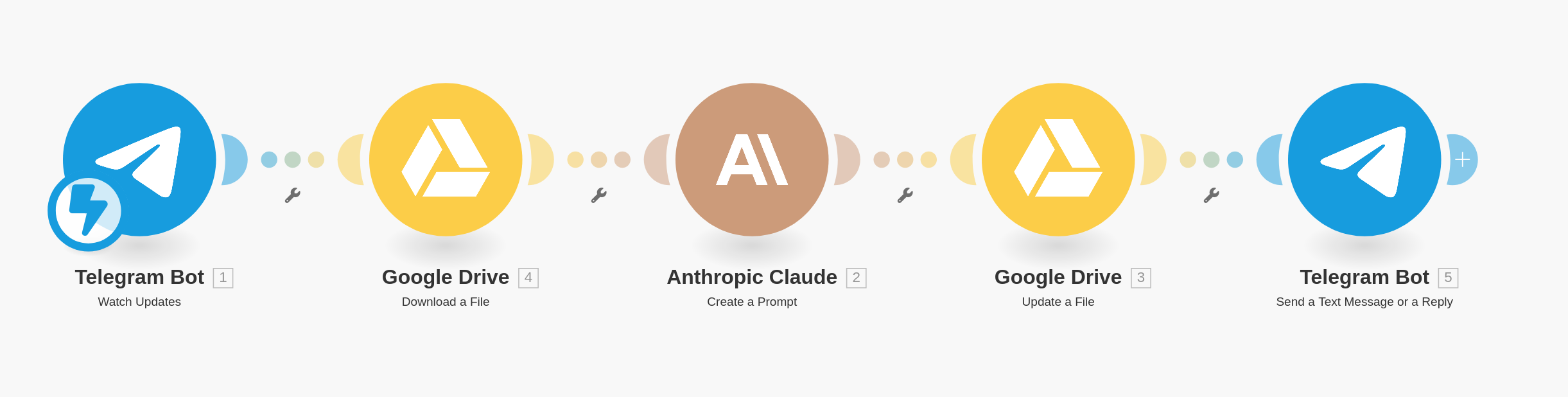
The Setup: How It All Works Together
My workflow consists of five steps, each playing a crucial role in keeping my tasks organized. Here’s how it all fits:
Step 1: Telegram Bot – Watch Updates
To keep the interface familiar and user-friendly, I use Telegram as my primary tool to interact with my to-do system. It acts as an entry point to send and receive updates. While I'm using Telegram here, you could use any messaging app that integrates smoothly. The bot watches for my inputs, whether that’s adding a new task or updating an existing one.
Step 2: Google Drive – Download the To-Do File
I store my to-do list in a simple markdown file on Google Drive. This allows me to easily manage and edit it. Whenever I need to update my to-do, the system downloads the current version of the markdown file. You could store your list anywhere—local storage, cloud, or another app—depending on your preferences.
Step 3: Claude AI – Generate the Prompt
This is where the real magic happens. I use Anthropic Claude AI to review my to-do list and update it based on my latest input. The prompt I use is designed to ensure the to-do list is kept tidy, and that each task has as much clarity as possible. Here's an excerpt of my prompt:
"We should have two outputs, updated_file_content and feedback for potentially asking for precisions or acknowledging the update. Output format should be only valid JSON. Be assertive by asking additional questions if needed, for example deadline and who is implicated. If the task is clear, no feedback is needed; say 'OK' as feedback."
This prompt ensures that the AI not only updates the content but also provides feedback if additional information is required, like deadlines or responsible parties, making sure nothing is left unclear.
Step 4: Google Drive – Update the File
Once the AI generates the updated to-do content, it is automatically saved back to Google Drive. This makes sure my to-do list is always current, without me having to make manual edits. It's a simple but efficient way to maintain a consistent workflow.
Step 5: Telegram Bot – Follow Up
After updating the to-do list, the Telegram Bot closes the loop. The exposed schema is a bit simplified for the purpose of explanation. If there are areas that need clarification, the bot asks follow-up questions, like deadlines or additional details about a task. If everything is clear, it just sends an "OK." This step ensures that every task is actionable, precise, and easy for anyone (or even future me) to understand.
Customization and Flexibility
I used Make as a no-code platform to connect all these steps, but any other automation tool could be used to achieve similar results.
The beauty of this setup is its adaptability. You could use another messaging app instead of Telegram or even swap Google Drive for another cloud storage option. The markdown format is lightweight and easy to manage, but other formats could also be used depending on what suits your style.
Benefits: Why This Works for Me
On my side, I am then using this to-do list to get regular executive summaries of what's most important for me. This step is optional but helps me maintain a clear focus on priorities.
Automation: Manual edits are almost eliminated—Claude takes care of the updates.
Clarity: By ensuring all tasks have complete information, I reduce the need for back-and-forths.
Accountability: Follow-up questions from the bot help ensure nothing falls through the cracks, and deadlines are always clear.
Conclusion
Managing a to-do list doesn’t have to be a burden. By integrating an AI assistant into the process, I’ve streamlined not only how I track tasks but also how I refine and update them. This kind of workflow allows me to stay on top of everything, without feeling overwhelmed by the administrative side of productivity.
Would this kind of setup help you better manage your daily tasks? Feel free to adapt the steps to create a system that works best for you!
Example of executive summary I get as a message :
Personal Todo Priority List 🚀:

High Priority Tasks 🔥:
• Renew car insurance (Deadline: 2024-01-14) 🚗
• Pay electricity bill (Deadline: 2024-01-12) ⚡️
• Book dentist appointment (Deadline: 2024-01-11) 🦷

Other Personal Tasks 📋:
• Grocery shopping 🛒
• Finish reading "Atomic Habits" 📚
• Clean the garage 🧹
• Repair kitchen faucet (Deadline: 2024-01-16) 🔧

Professional Follow-ups 👔:
• Prepare financial report for Q4 (Deadline: 2024-01-15) 📊
• Draft proposal for new client project (Deadline: 2024-01-17) 📝
• Plan the extended team lead training workshop (Deadline: 2024-01-20) 🎓

Creative Space 💡:
• Organize a team-building event focused on creativity 🎨
• Develop a "week without meetings" concept to boost productivity 🚀

Recommended Action Order:
1️⃣ Pay electricity bill
2️⃣ Book dentist appointment
3️⃣ Renew car insurance
4️⃣ Prepare financial report for Q4
5️⃣ Grocery shopping
6️⃣ Draft client proposal
7️⃣ Plan team lead training workshop
Example of todo.md file :
# Todo personal:
- Grocery shopping
  - Deadline: 2024-01-10
  - Priority: Medium
- Book dentist appointment
  - Deadline: 2024-01-11
  - Priority: High
- Finish reading "Atomic Habits"
  - Deadline: 2024-01-15
  - Priority: Low
- Clean the garage
  - Deadline: 2024-01-13
  - Priority: Medium
- Renew car insurance
  - Deadline: 2024-01-14
  - Priority: High
- Pay electricity bill
  - Deadline: 2024-01-12
  - Priority: High
- Repair the kitchen faucet
  - Deadline: 2024-01-16
  - Priority: Medium
- Schedule parent-teacher meeting
  - Deadline: 2024-01-11
  - Priority: Medium
- Organize kids' coding lessons
  - Deadline: 2024-01-20
  - Priority: Medium
- Replace living room curtains
  - Deadline: 2024-01-18
  - Priority: Low

# Todo pro:
- Prepare financial report for Q4
  - Deadline: 2024-01-15
  - Priority: High
- Review team members' yearly performance evaluations
  - Deadline: 2024-01-13
  - Priority: Medium
- Draft proposal for new client project
  - Deadline: 2024-01-17
  - Priority: High
- Finalize budget allocations for 2024
  - Deadline: 2024-01-19
  - Priority: High
- Arrange a meeting with advisor on strategic initiatives
  - Deadline: 2024-01-16
  - Priority: Medium
- Collaborate with marketing on new campaign for Q1
  - Deadline: 2024-01-22
  - Priority: Medium
- Update company procedure documents
  - Deadline: 2024-01-23
  - Priority: Low
- Develop onboarding materials for new hires
  - Deadline: 2024-01-18
  - Priority: Medium
- Plan the extended team lead training workshop
  - Deadline: 2024-01-20
  - Priority: High
- Follow-up with Fairchain client on project milestones
  - Deadline: 2024-01-12
  - Priority: High

# Ideas:
- Organize a team-building event focused on creativity
- Develop a “week without meetings” to boost productivity